The European Accessibility Act came into force in June 2025, raising WCAG AA compliance from a best practice to a legal requirement for most web projects in the EU. Among the criteria that standard covers, WCAG 3.1.2 is one of the most consistently missed in editorial workflows: it requires that any change of language within a page be identified in the markup. Content that mixes languages is nearly universal, since any site writing in Spanish will borrow English terms, and any site writing in English does the same in the other direction. That language-mixing fails this criterion silently, and most sites have no mechanism in place to fix it. Drupal 10 and later ship with a native solution in Core that requires no extra modules, and the gap between sites that comply and sites that fail is almost always just a matter of awareness.
The accessibility gap: foreign words
Accessibility now carries weight on two fronts at once. It improves SEO, and it is a legal requirement. Since the European Accessibility Act came into force in June 2025, meeting WCAG level AA stopped being a good practice and became a legal must for any web project.
One of the most frequent mistakes when authoring content sits right at this intersection: using a word or expression from another language without identifying or marking it semantically. The most common case is writing in your main language and reaching for loanwords. A text in Spanish borrows anglicisms like link, marketing, or cookies; a text in English borrows words from other languages the same way.
This maps to a specific rule. WCAG 3.1.2 "Language of Parts" (level AA) requires that any change of language inside a page be identified in the markup. The French RGAA states the same in its criterion 8.7. The rule is precise, and so is the way to satisfy it.
The cost is easiest to understand from the listener's side. A blind user runs a screen reader set to English and reaches the unmarked word "paella". The synthesizer applies English phonetics, something close to "pay-ell-uh". The reading breaks, and the word often becomes hard or impossible to understand.
Beyond that broken experience, the markup failure has a formal consequence. An unmarked change of language fails WCAG 3.1.2, and failing that criterion means failing WCAG AA, which is now the legal bar.
Drupal's CKEditor Language plugin
From Drupal 10 on, Core already provides a native, simple answer to these criteria: the CKEditor "Language" selector plugin. No extra module, no complex dependency. If the site already runs CKEditor, the tool is already there. It allows to wrap each foreign word in a <span> with the correct lang attribute, making it complaint with the accessibility mandate.
A plugin this useful should not be missing from any site that takes accessibility into account. Yet it gets ignored constantly, and the reason is mostly lack of awareness. Accessibility gained real weight only recently, so many technical profiles never learned the plugin existed. It does not help that the button is not enabled by default in Drupal's standard text formats. If nobody adds it to the toolbar, nobody uses it.
How to set it up
Turning the feature on is a short configuration task with no code involved. The steps are:
- Go to Administration > Configuration > Content authoring > Text formats and editors.
- Drag the Language button into the editor's active toolbar.
- Scroll down on the same page, choose in the configuration tab which languages appear in the dropdown, and save.
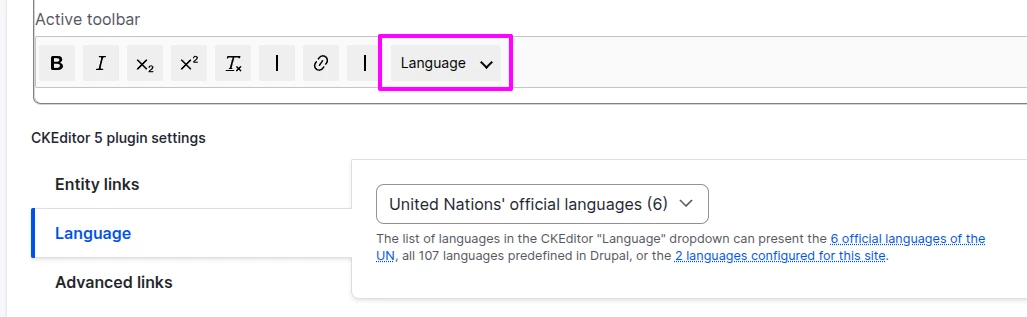
One detail is worth calling out. The selector can present the 6 official UN languages, the 107 languages predefined in Drupal, or a list limited to the languages already configured on the site. Multilingual configuration and content accessibility are separate concerns in this case, so the languages that appear in the selector are independent of the languages you have configured on your site (unless you select the "Site-configured languages" option).
How to use it
Once the button is in the toolbar, the day-to-day use is simple, and it happens by hand while writing. Write the text that needs a word in a language different from the current content, select that word, and indicate which language it belongs to.
The result is the exact markup the criterion expects. Take an English sentence that borrows a Spanish word:
<!-- Before -->
<p>For dinner, we went to the new restaurant downtown to eat some authentic paella.</p>

<!-- After -->
<p>For dinner, we went to the new restaurant downtown to eat some authentic <span lang="es" dir="ltr">paella</span>.</p>
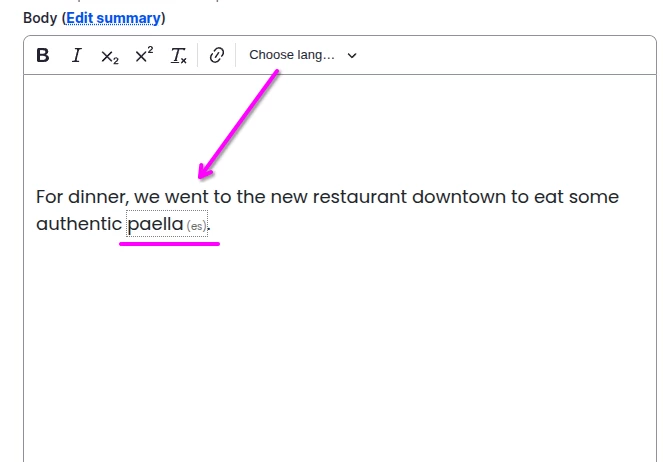
It works the same way in the other direction, a Spanish sentence borrowing an English word:
<!-- Before -->
<p>El cliente nos ha dejado un feedback muy positivo sobre la nueva interfaz.</p>

<!-- After -->
<p>El cliente nos ha dejado un <span lang="en" dir="ltr">feedback</span> muy positivo sobre la nueva interfaz.</p>
The plugin also adds dir="ltr" automatically to indicate the reading direction for the selected language. For a language such as Arabic or Hebrew it would apply dir="rtl" instead, so right-to-left words are handled correctly without any extra step.
The one catch: marking is manual
There is one honest limitation to state plainly. The tagging is manual and depends on editor discipline. The plugin does not retro-apply to content that was published before the button existed, and new content only gets marked when someone remembers to mark it while writing.
This is worth naming because it shapes how the feature fits into a real editorial process. The solution is native and easy, but it is not fully automatic. Making it stick means treating the markup as part of writing, not as a separate accessibility pass done later. On a site with a large back catalogue, closing the gap on old content is a deliberate task of its own.
Conclusion
Compliance with the criterion for marking foreign words sits one click away, inside the editor itself. Drupal makes it native, both roles have a trivial part to play, and the only real effort is the habit of marking words as they are written. Given how simple the tool is, and how directly it ties to a legal requirement, leaving it switched off is hard to justify.
If you need help or support implementing this or other accessibility criteria, Metadrop can help as accessibility experts. Get in touch.