What the CKEditor5 Markdown module does
The module adds a new toolbar button to Drupal's CKEditor5 editor. Click it, paste or type Markdown into the dialog that appears, confirm, and the content is inserted as formatted HTML at the cursor position.
The conversion uses the marked library (version 9, MIT licence) with GitHub-Flavored Markdown support enabled. The library is bundled into the compiled asset via Webpack, so no additional frontend build step is required.
The module requires Drupal 10.3 or higher, or Drupal 11, with the core ckeditor5 module enabled.
CKEditor5 markdown example
Why explicit conversion instead of the official Paste Markdown feature
CKEditor5 includes a built-in Paste Markdown feature that detects Markdown in the clipboard and converts it on paste.
That feature is still experimental. Not all Markdown constructs are reliably detected. Some text blocks pass through without any conversion. The auto-detection heuristics can also interact with other active plugins: Paste from Office, Paste from Google Docs, and Autoformatting can all interfere, producing inconsistent results depending on which plugin set is active.
This module takes a deliberate approach. Editors trigger the conversion intentionally by clicking the toolbar button, pasting Markdown into the dialog, and confirming. There is no clipboard sniffing, no heuristic guessing, no edge cases from competing plugins.
Other Drupal modules support Markdown in CKEditor5, but they take a different tradeoff: they restrict the editor to Markdown-only output, or allow mixed formats in ways that can create output conflicts. That approach works for a personal site where one person controls both the content and the format. It may not work reliably for a corporate website where editorial teams mix content sources and output consistency matters.
How to install and configure the module
You can install, as always, using Composer:
composer require drupal/ckeditor5_markdown
drush en ckeditor5_markdown
The module can also be enabled through the Drupal admin UI after the Composer step.
To configure the editor, go to Administration > Configuration > Content authoring > Text formats and editors. Edit the text format that uses CKEditor5 and drag the Paste Markdown button into the active toolbar.
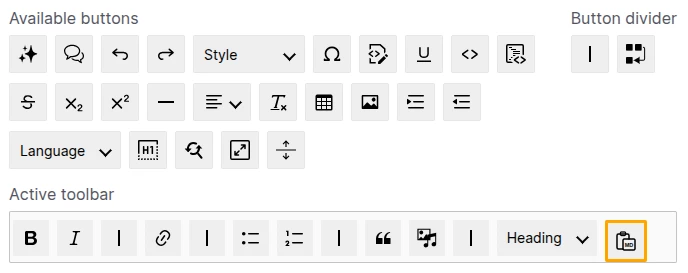
CKEditor5 filters the HTML it accepts based on the plugins and features enabled in its configuration. The module converts Markdown to HTML, but CKEditor5 will silently strip any elements that are not permitted by the active plugin set. For example, a # Heading 1 in the Markdown only inserts as an <h1> element if the Heading plugin is enabled and <h1> is configured as an allowed heading level. Review your CKEditor5 toolbar and plugin configuration before using the button to confirm that the HTML elements corresponding to your intended Markdown are permitted.
Final thoughts
Explicit Markdown conversion is more predictable than auto-detection for any editor working in a mixed-format environment. The module fills a specific gap: reliable, intentional Markdown-to-HTML for Drupal and CKEditor5, without locking the site into Markdown-only output or accepting the unpredictability of experimental clipboard detection.
I built this module because Markdown to Drupal is my daily workflow: content drafted in Markdown, often with AI assistance, then pasted into CKEditor5 for final editing and publishing. This module is part of the same content-first authoring philosophy as the Content First module.
Try the module: https://www.drupal.org/project/ckeditor5_markdown