The files that Drupal does not track
Any long-lived Drupal site, whether it stores files in a local folder or a remote bucket like Amazon S3, holds hundreds of files, and there is no easy way to see which ones Drupal still tracks and which it has lost sight of. The files come from four places: live content, leftovers from nodes deleted years ago, migration and backup residue, and direct uploads, such as a PDF dropped onto the server because it was faster.
This is a common problem in the sector, and it does not depend on the technology in use. Every content system faces it sooner or later. The root cause is two stores that must agree: the bytes in storage versus the database that is supposed to keep track of them. The moment both stores exist, they drift. It happens in three ways: records get deleted but the files stay, files get uploaded but never registered, and jobs fail halfway.
These accumulated unreferenced files are untracked files, a kind of dark data: information an organisation keeps but no longer uses.
The cost of untracked files
The first cost is storage and governance, not just disk space. The second, sharper cost is exposure and security. An untracked file does not always disappear. In many setups it stays physically present, and anyone with the URL can download it. A document deleted in content can still sit in storage. A sensitive file uploaded directly, by FTP, migration, or other means, never registers with Drupal at all. It sits exposed at its URL, and no screen even lists it.
Severity depends on the content type: trivial for ordinary assets, serious for contracts, personal data, or internal reports. The organisation stays responsible for files it cannot even see.
How the problem looks in Drupal
A file entity is Drupal's record of a file. A media entity wraps that file with a type, metadata, and a reusable identity, and it is Drupal's recommended way to handle files. Drupal also tracks where each file is used. The principle everything else rests on: a file only exists for Drupal through these records. No record means a file is not tracked by the application, so it is not managed in any way.
This is the case of unmanaged files: files on disk with no file entity at all. Drupal is blind to them. Because nothing references them, nothing governs them, and no screen lists them.
There is another case: files known by Drupal but not used anywhere. Orphaned managed files are this case. The file entity exists, but the usage count has dropped to zero, usually because the node or media item using the file was deleted. Drupal knows about the file; it just never cleans it up by default.
Either way, storage grows silently, and there is no built-in screen that reconciles the files present in storage against the managed entities.
What existing modules do, and where they stop
There are some other modules that deal with this problem, but it is good to know to what extent:
- Fancy File Delete deletes both unmanaged files and detached file entities. It runs through Drush and the Drupal UI, but it seems developer-oriented and it is deletion-only.
- Audit Files is the closest relative. Its reports cross-check storage, file entities, usage, and content references, and it can even add an unmanaged file to the database. But it only creates a bare file entity, with no usage record and nothing in the Media library, so the file ends up known but unusable. It makes Drupal aware of the file without making the file completely useful. It is also developer-facing and intermittently maintained.
Both share something: they are developer-facing tools whose answer is to delete or to bare-register. None brings the file under management as a reusable asset, and none targets the editor or site builder who owns the content.
The principles behind File Inspector
File Inspector does three things about the discussed problem: it inventories everything in storage, it reconciles each file against what Drupal manages, and it lets you either delete true orphans or promote useful files into managed Media. It does all of this from a readable UI, not the command line, and that UI is its main differentiator. It rests on a few principles:
- Visibility before action: start with a trustworthy, readable inventory of files and their status, because nothing can be managed, deleted, or governed while it stays unseen, and then act.
- Reconcile, not just delete: many files are live assets that were never registered, so the fix must pull them into management, wrapping the file in a media entity instead of a bare, unusable file entity, so it can be found and placed like any other asset. "One action, both entities."
- Built for editors and site builders, not only developers: clear reports and actions in the UI, with filters, bulk operations, and proper permissions, so acting on files is safe without touching code.
- Scale: real sites hold tens or hundreds of thousands of files, so the inventory must run without exhausting memory or timing out.
- Aware of subtle cases: embedded mini-sites, such as HTML flipbooks or static microsites, are many files behind a single entry point. Treating each supporting asset as an independent orphan creates noise, so the tool must understand these structures.
- Scope: it deliberately targets the harder unmanaged files Drupal cannot see, walking the file system and labelling each file managed or unmanaged. Orphaned managed files are left to existing entity-side tools. File Inspector owns the bytes Drupal never knew were there.
How File Inspector works
The steps for using this module are as follows:
- Configure the module: A settings form keeps the inventory focused. You choose the MIME types to inspect (images, PDFs, Office documents, or wildcards like
image/*), the folders to exclude (asset and system folders such ascss,js, andstyles), and the folders that hold embedded web roots. Two switches control whether delete and import-to-Media are offered. Generate the report: A batch size tunes how many files run per pass. The scan iterates with generators and the Batch API, so it inventories files without exhausting memory. The results are stored in a dedicated table for fast querying, instead of being recomputed on every view.
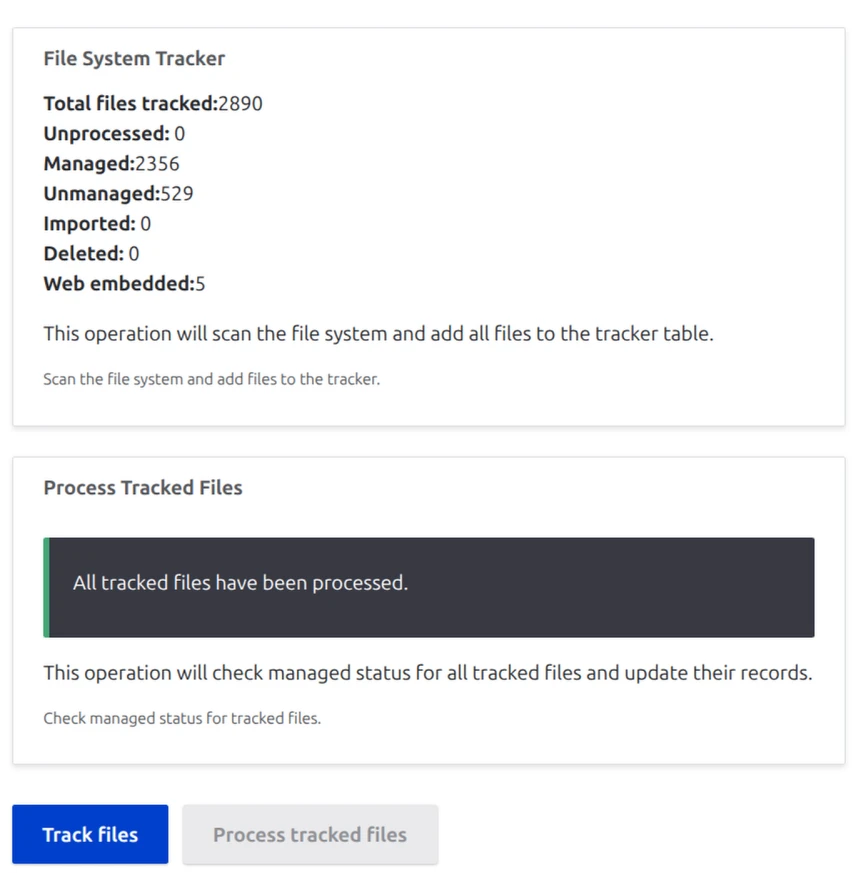
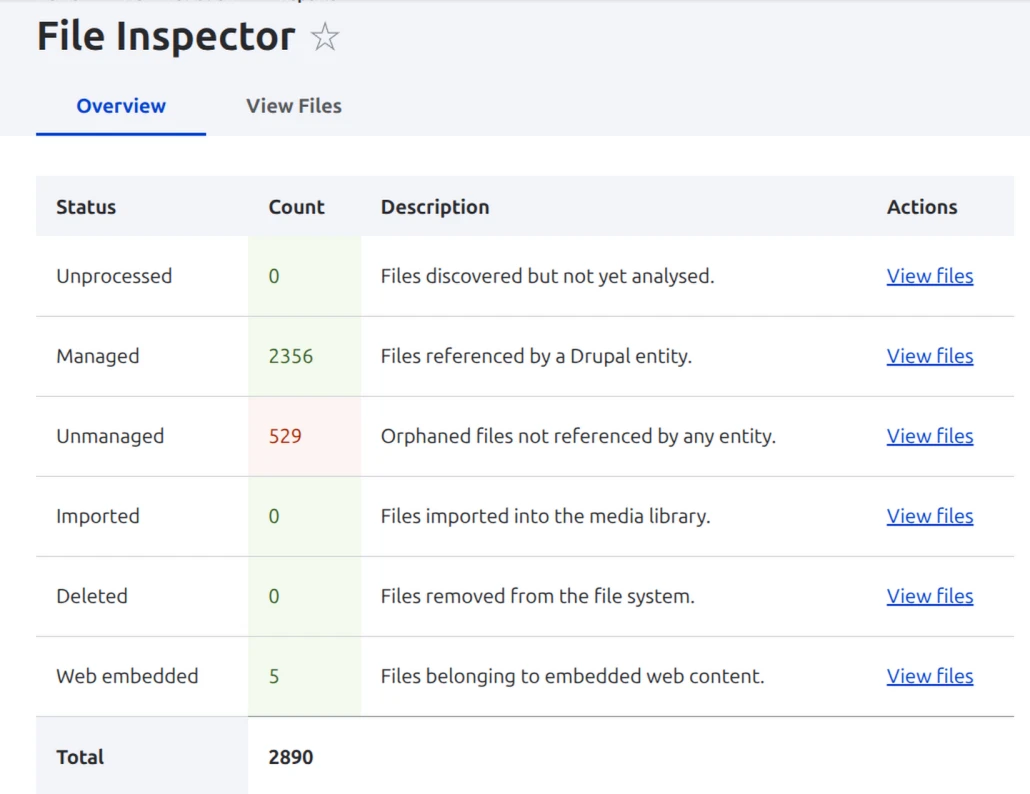
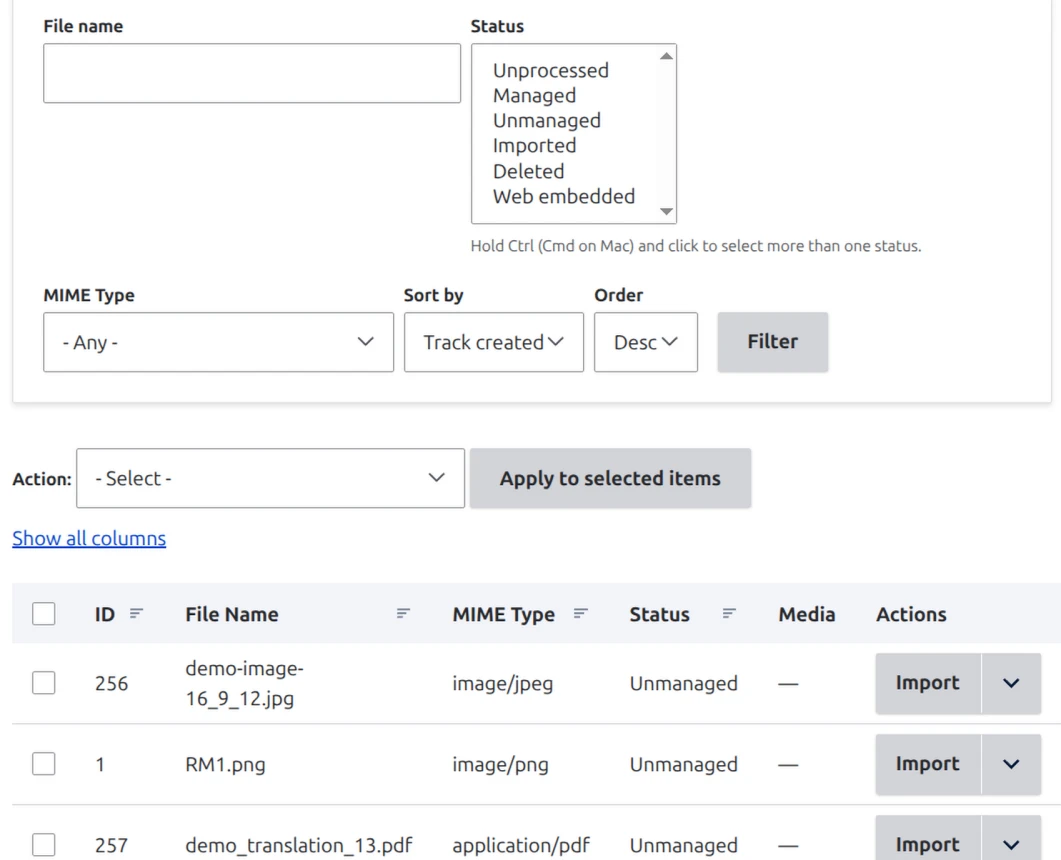
Read the report: overview and file list: The overview page is a report you can actually read, with the inventory reconciled against the managed entities. It has two tabs: Overview counts every file by status, such as managed, unmanaged, or imported, with a grand total, and the file list shows every file found.
Filter and act with Views: The report is built on Views: filter by status, MIME type, or date, run bulk operations, and extend it as a site builder without code. This directly solves the "built for coders" gap.
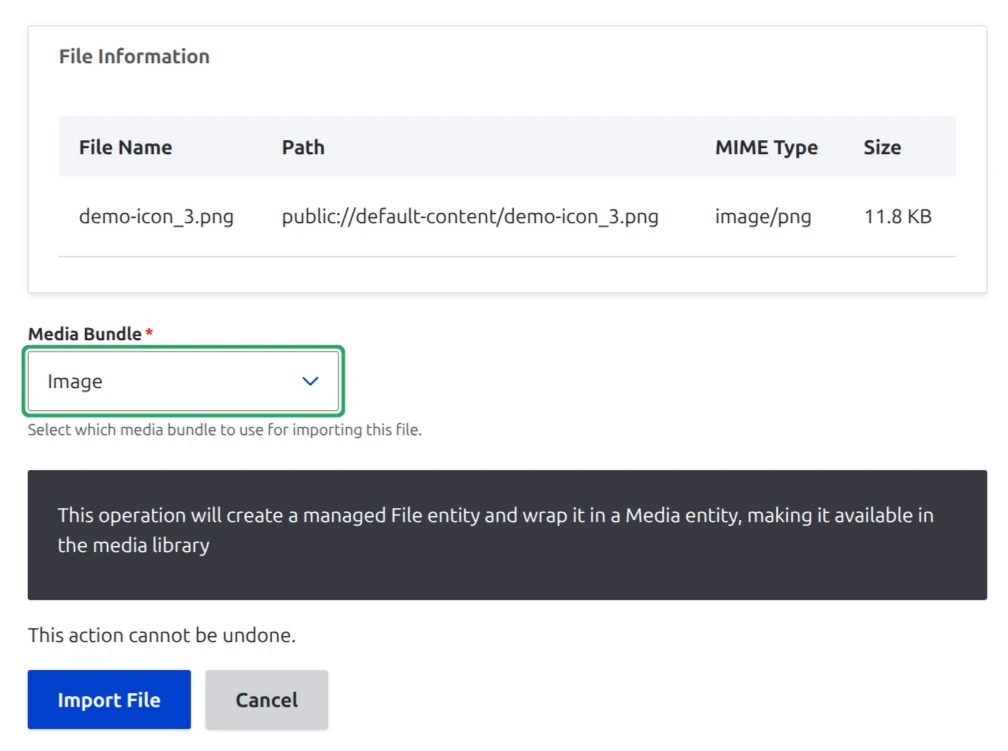
Reconcile each file: You decide whether to delete a file or import it into a media item. For an unmanaged file worth keeping, you promote it to a managed Media entity in a single action and choose the media type. This creates both the file entity and the Media item, which appears in the Media library, and records the link between the report row and the Media it produced. The file becomes a reusable asset, not just a registered one. Reconciliation becomes a first-class workflow, aligned with Drupal's recommended file handling.
Conclusion
The drift between storage and database is universal, and it carries real costs in storage, governance, and trust. Drupal only makes it concrete: files end up with no entity, invisible to the system meant to track them. Existing tools proved the need, but they are developer-facing, and their best answer is to delete or to bare-register.
File Inspector takes a different stance, in four points: inventory first; reconcile all the way to a usable Media item; built for the people who manage the content; scale to real sites with a lot of content. There is now a user-friendly way to manage untracked files in Drupal.