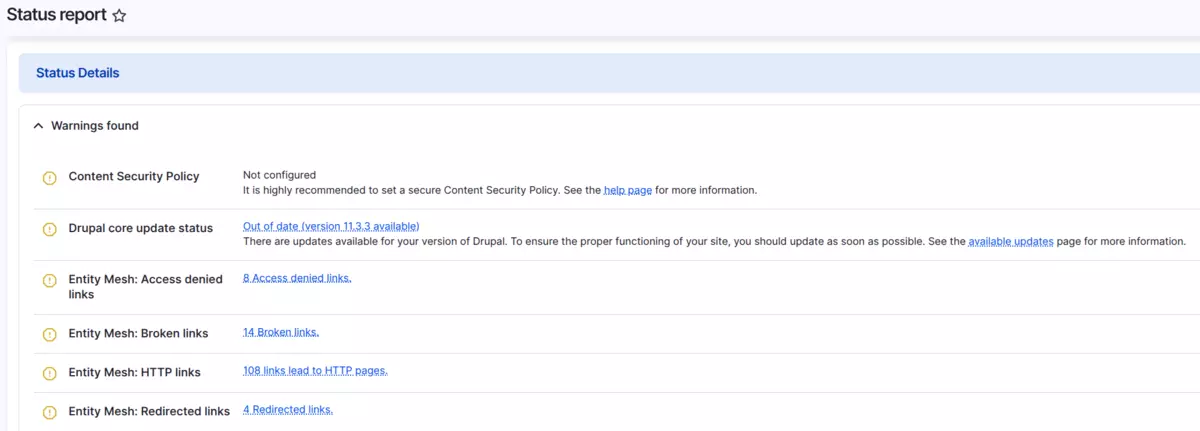
You know the drill. You visit the Drupal Status Report to check if anything needs attention, and you're greeted by a wall of warnings you've seen dozens of times before.
Some warnings are important. Others? Not so much. Maybe you're tracking an update notification in your Gitlab and don't need the constant reminder. Perhaps there's a PHP deprecation notice you're already aware of and planning to address during your next scheduled upgrade. Or you're seeing environment-specific warnings that simply don't apply to your infrastructure setup.
The noisy status report problem
The problem is that all these warnings sit alongside genuine issues that actually need your attention. The noise drowns out the signal. You end up scrolling past the same irrelevant messages every time, increasing the chance you'll miss something that matters.
Over time, you develop warning blindness. Your brain learns to ignore the status report page entirely because the signal-to-noise ratio is too low. Then, when a genuine security update appears or a database schema issue emerges, it gets lost in the familiar sea of orange and red.
This problem multiplies across teams. Each developer independently decides which warnings to ignore. New team members have no way to know which warnings matter and which ones are environmental noise. The status report becomes unreliable, defeating its entire purpose.
How Requirements Manager works
To address to this problem we developed Requirements Manager. The module provides a centralized interface where you can manage every requirement your site generates, hide them, change their severity, or leave them as-is. Now, you can hide a requirement or change its severity level and document why.
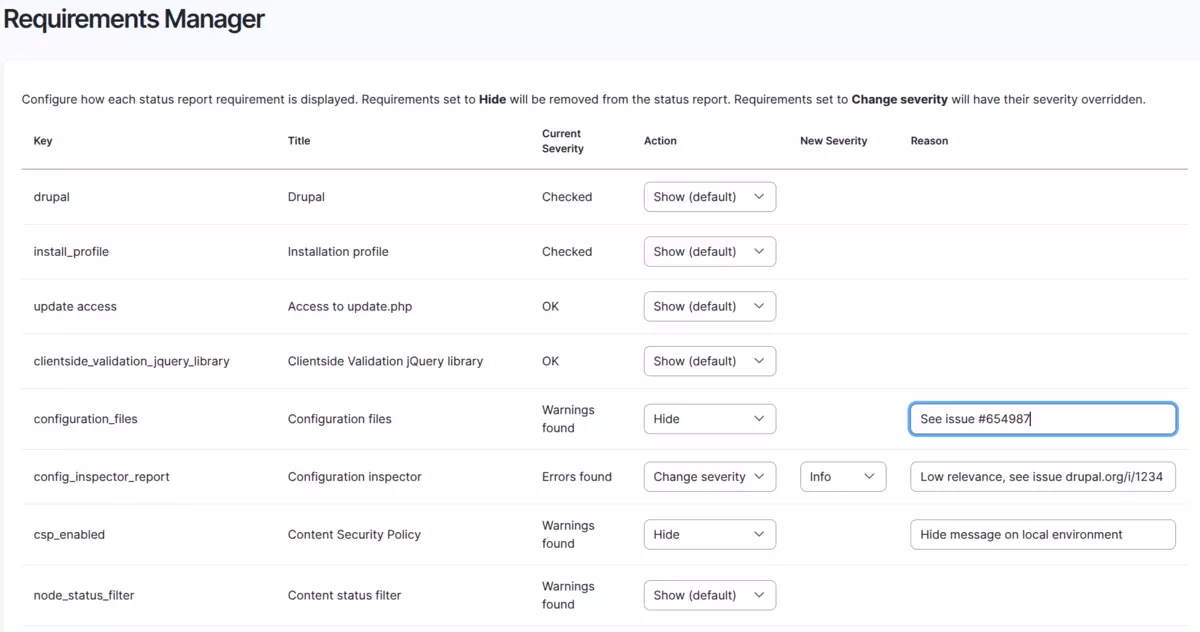
Requirements Manager dashboard with a list of configurable security settings.
The module operates transparently. When you modify a requirement's severity, it appends a notice to the status report showing exactly what changed and why:
Severity altered from "Warning" to "Info" state by Requirements Manager. Reason: Memory limit controlled by hosting provider, warning not actionable
Anyone viewing the status report can immediately see which requirements have been customized and understand the reasoning behind each decision. No documentation archaeology required.

Info message altered by Requirements Manager from the status report page
Why this matters for your project
Requirements Manager demonstrates principles that benefit any Drupal project:
- Preserve institutional knowledge. The "Reason" field ensures that when developers leave or teams change, critical context doesn't disappear. Your new team members understand why decisions were made without archaeological code digs or expensive knowledge-transfer sessions.
- Security through clarity. Real errors don't get lost in noise. When your status report is clean and every alteration is transparent, genuine security issues and critical updates stand out immediately. Your team can focus on what actually needs attention.
Common use cases
Through our client work and feedback from the Drupal community, we've identified specific scenarios where Requirements Manager proves valuable.
- Managed hosting constraints: Your hosting provider controls PHP versions and has already scheduled an upgrade to PHP 8.3 for next quarter. The "PHP version will be unsupported" warning is accurate but not actionable by your team. Downgrade it to "Info" with a note: "Hosting provider upgrading Q2 2026."
- Planned maintenance windows: You've identified a security update but have scheduled it for next month's maintenance window with stakeholder approval. Document the plan ("Scheduled for March maintenance, ticket #1234") and temporarily downgrade the severity so daily status checks don't create false urgency.
- Multi-environment deployments: Production uses external monitoring tools to track updates, but your staging environment relies on Drupal's built-in checks. Use Config Split to hide update status in production while keeping it visible in staging, same codebase, different configuration per environment.
- Third-party module quirks: A contributed module reports a "database schema mismatch" that you've confirmed is a false positive from the module's detection logic. You've reported the bug to the module maintainers. Hide the warning with a link to the issue: "False positive, see drupal.org/i/1234."
Why we created Requirements Manager
At Metadrop, we noticed a pattern across client projects. Every site we built or maintained had three to five requirements that already had planned solutions or were pure noise.
We decided to build Requirements Manager as a contribution to the Drupal community. The goal was simple: replace repetitive custom code with exportable configuration that includes built-in documentation.
Here's what the old approach looked like:
/**
 * Implements hook_requirements_alter().
 */
function mysite_requirements_alter(array &$requirements): void {
  // Content views require a status filter to avoid content access issues.
  unset($requirements['node_status_filter']);

  // Downgrade PHP memory warning - adequate for this use case.
  if (isset($requirements['php_memory_limit'])) {
    $requirements['php_memory_limit']['severity'] = REQUIREMENT_INFO;
  }
}
This reflects our philosophy at Metadrop: We build for long-term maintenance, so we develop a contrib module for that.
Getting started
Requirements Manager is available now on drupal.org, free and open source for the Drupal community.
Install Requirements Manager like any Drupal module:
composer require drupal/requirements_manager
drush en requirements_manager
Navigate to Configuration → System → Requirements Manager (/admin/config/system/requirements-manager).
You'll see a table listing all current requirements. For each one you want to modify, select an action from the dropdown. When you choose "Hide" or "Change severity", additional fields appear for the new severity level and your reason.
Best practice: Always fill in the "Reason" field. A good reason explains the context: "Tracking in issue #1234, planned for Q2 upgrade" or "Not applicable in development environments" or "Controlled by hosting provider, not actionable by us".
Click Save configuration, then visit /admin/reports/status to verify your changes. Export your configuration to preserve settings across environments:
drush cex -yOne helpful feature: if you hide a requirement, it still appears in the admin form with a "(hidden by this module)" label. This means you can always un-hide requirements later by changing the action back to "Show".
Requirements Manager has one performance consideration worth mentioning. The admin form calls SystemManager::listRequirements(), which invokes all requirement hooks from all enabled modules. On sites with many modules, the form might take a few seconds to load.
More importantly, here's when you should NOT use Requirements Manager: don't hide actual errors that need fixing. This tool is for managing noise and environment-specific warnings, not for masking real problems. If your database is genuinely out of date or your PHP version is unsupported, hiding the warning doesn't solve the underlying issue.
A real configuration example
After configuring requirements through the UI, your settings are stored in requirements_manager.settings.yml. Here's what a typical configuration looks like:
requirements:
  php_memory_limit:
    action: change_severity
    severity: info
    reason: 'Memory limit controlled by hosting provider, warning not actionable'
  cron_last:
    action: change_severity
    severity: warning
    reason: 'Upgraded from info to ensure cron monitoring'
The configuration only stores non-default values. If you set a requirement's action to "Show" (the default), it's removed from the configuration entirely. This keeps your config exports clean and makes it immediately obvious which requirements you've customized.
Under the hood: modern Drupal development
Requirements Manager takes advantage of features introduced in Drupal 11.2, making the code future-proof and standards-compliant. By using the latest Drupal conventions, we minimize technical debt and ensure the module will remain compatible with future Drupal versions.
The module uses the RequirementSeverity enum instead of deprecated integer constants, providing better type safety and clearer code:
protected const SEVERITY_MAP = [
  'info' => RequirementSeverity::Info,
  'ok' => RequirementSeverity::OK,
  'warning' => RequirementSeverity::Warning,
  'error' => RequirementSeverity::Error,
];
We implement the hook using PHP 8 attributes instead of a .module file:
#[Hook('runtime_requirements_alter', order: Order::Last)]
public function runtimeRequirementsAlter(array &$requirements): void {
  $overrides = $this->configFactory
    ->get('requirements_manager.settings')
    ->get('requirements') ?? [];

  foreach ($overrides as $key => $override) {
    if (!isset($requirements[$key])) {
      continue;
    }

    $action = $override['action'] ?? 'show';

    switch ($action) {
      case 'hide':
        unset($requirements[$key]);
        break;

      case 'change_severity':
        $requirements[$key]['severity'] = self::SEVERITY_MAP[$override['severity']];
        break;
    }
  }
}
The Order::Last parameter is key. It ensures Requirements Manager's alterations run after all other modules have contributed their requirements, preventing our overrides from being inadvertently modified, preventing subtle bugs handling the requirements,
By using PHP 8 attributes and modern Drupal patterns, we're ensuring this code will age well. Sites built with current standards avoid the costly rewrites that plague projects built with legacy approaches.
Conclusion
If you face this very same problem, dealing with messages in the status reports that don't accurately reflect your project current status, and you probably are, this module is good addition to your tool belt. It is simple, easy to use, performant and provides a useful functionality to teams maintaining sites.
The module is built with Metadrop's philosophy on mind: solving complex Drupal problems with clean, maintainable architecture and sharing the result. We contribute actively to the Drupal ecosystem because we believe in building solutions that benefit everyone, not just our clients.